Marketing Lead
.png)
February 11, 2026
•
8 Mins read
It’s almost midnight in Lagos. As an HR leader, you should be asleep, but critical payroll deadlines keep you up, working through a large Excel sheet to finish your tasks.
Names blur together, formulas stop working, and a single wrong minus sign could interfere with the entire payroll. One mistake can result in major issues.
This isn’t a one-time issue. It’s a constant risk for organisations that depend on spreadsheets for performance reviews.
Performance appraisal matters because it ties personal accomplishments to organisational goals and helps management make decisions about promotions, development and compensation.
Many organisations stick with spreadsheets for performance reviews, believing Excel's low cost and flexibility outweigh its serious risks.
But when careers and large sums of money are involved, relying on this method can result in serious problems.
This article argues that continuing to use Excel for performance reviews can lead to far greater business costs than most leaders recognise.
We’ll explore hidden risks, share real examples of spreadsheet mistakes, and explain how technology can make performance management more reliable, especially for African organisations focused on lasting growth.
You’ll also find a practical, step-by-step plan to modernise your review process, avoid costly errors, and provide your team with better tools.
Why Performance Appraisals Matter
Before we discuss Excel’s problems, it’s important to remember why performance appraisals matter.
Performance evaluation collects information on task completion, behaviour, and job factors for both private and public sectors.
Strong appraisals align personal contributions with organisational goals, encourage development and highlight areas for improvement.
Research shows that appraisals can significantly improve task performance, although additional strategies are needed to enhance adaptability and contextual behaviours.
Recent research also recommends using tailored methods and new technologies to improve appraisals. The key takeaway is that performance reviews are more than routine tasks. They help connect people’s strengths to important business goals.
Errors and Hidden Risks in Spreadsheets
Spreadsheets feel safe because they’re ubiquitous and inexpensive. Yet every HR leader who’s wrestled with formulas knows they’re fragile.
Spreadsheets require a lot of time to manage and are becoming harder to use in today’s fast-paced workplaces. Although they seem convenient at first, they mask deeper issues such as manual data entry, calculation errors, and security risks.
Performance review spreadsheets are particularly risky because they involve many hands and sensitive data.
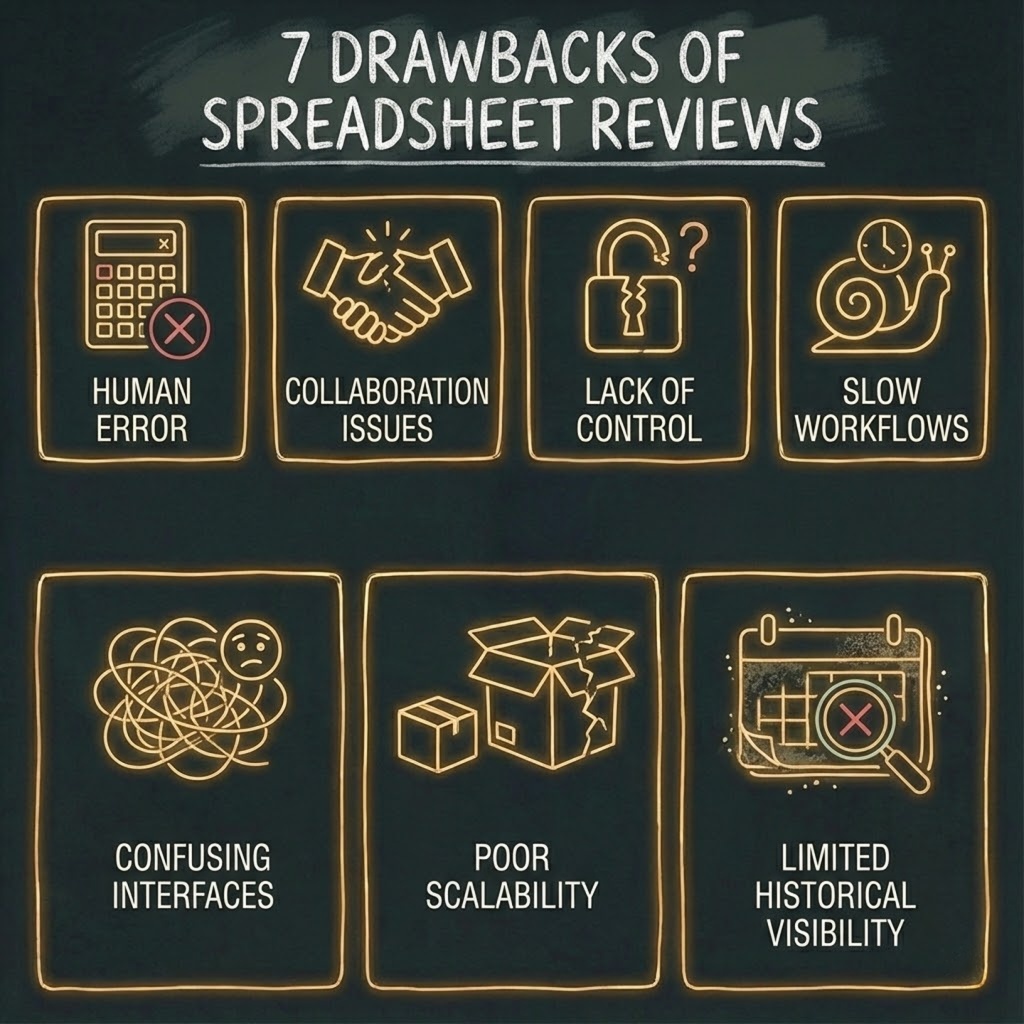
The Figures HR blog lists seven drawbacks of spreadsheets for pay reviews: human error, collaboration issues, lack of control, slow workflows and approvals, confusing interfaces, poor scalability, and limited historical visibility.
Managers often rush to create and merge many spreadsheet versions. With every review cycle, the risk of a costly mistake increases.
When multiple people can edit a document without robust version control, there’s nothing stopping someone from accidentally deleting a formula or exposing confidential compensation data.
Researchers studying spreadsheet errors found that mistakes occur in 0.8%–1.8% of all formula cells.
While some errors have no quantitative impact, others can substantially affect key outputs.
Business articles show simple typos, and hidden rows can cost millions. One study cited a manufacturer that had a $3 million budget gap due to a misplaced decimal in Excel, leading to an overestimation of resources.
In the HR domain, spreadsheet errors can be equally catastrophic. For instance, a mid-sized company faced backlash after an Excel error led to incorrect pay raise calculations, resulting in an inadvertent salary cut for dozens of employees. This not only affected the team's morale but also exposed the company to potential legal challenges.
Consider JP Morgan’s $6 billion trading loss caused by a copy-and-paste error, or the $2.6 billion dividend mistake at Fidelity when an accountant missed a minus sign.
Even smaller errors, like Kodak’s $11 million severance mistake or Utah’s $25 million budget shortfall, stem from mismanaged spreadsheets.
The risk isn’t just in finance. Spreadsheets used in many industries show all kinds of errors, and researchers say there’s no standard way to classify these mistakes.
Without standard audits, you might never know if your formulas are reliable.
When spreadsheets are used to decide bonuses, promotions, and pay raises, hidden costs can appear as legal risks, lower morale, and loss of trust.
Real‑World Costs of Poor Performance Management
Beyond the risk of formula errors, the traditional performance review process itself is costly.
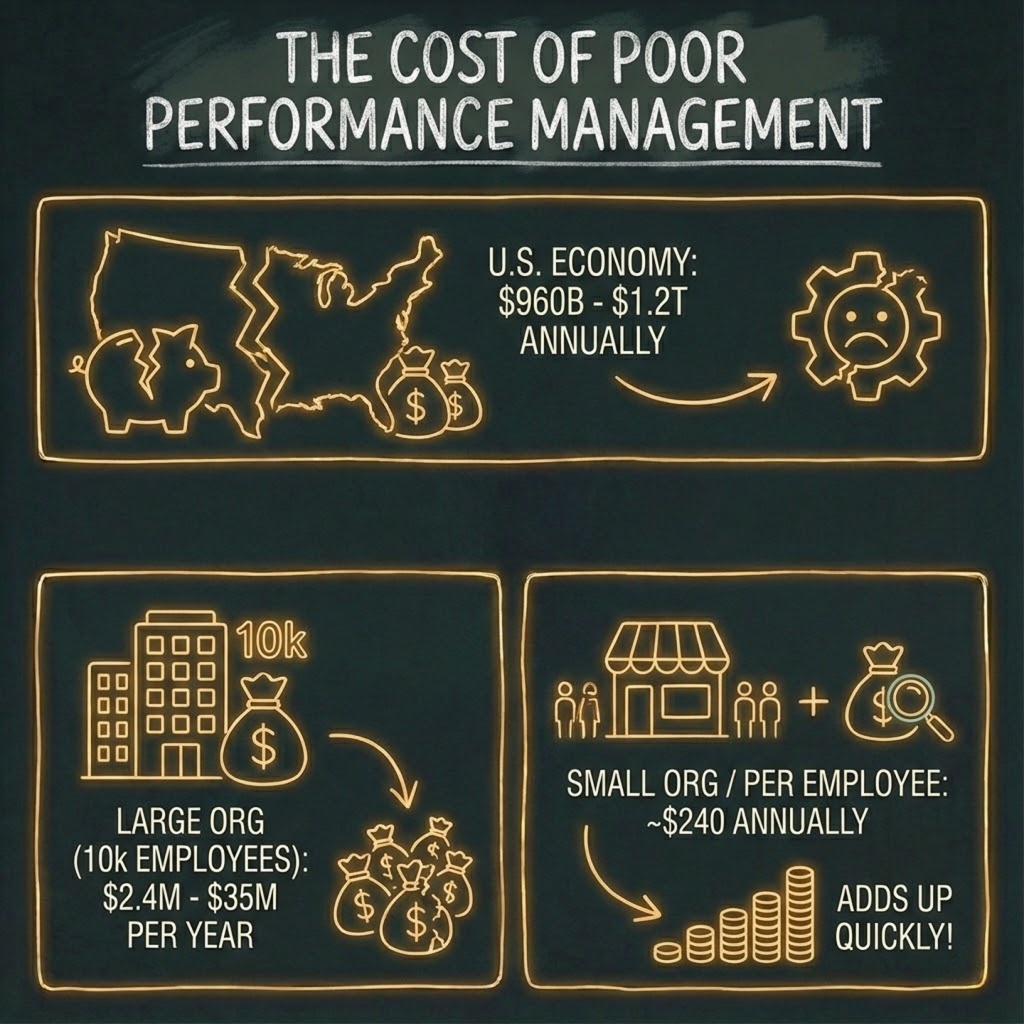
Gallup’s research on performance management found that disengaged or actively disengaged employees cost the U.S. economy between $960 billion and $1.2 trillion annually.
For individual organisations, poor performance review processes can cost $2.4 million to $35 million per year for a company with 10,000 employees.
However, the impact is not limited to large businesses. Smaller organisations can also face high costs, often more pronounced per employee due to fewer resources and limited scale.
Estimates suggest that ineffective review processes can cost approximately $240 per employee annually, adding up quickly even for small companies.
Using a modern, streamlined review process helps organisations of any size avoid hidden costs and work more efficiently.
Adobe’s internal analysis showed that ditching annual reviews saved over 2 million hours previously spent preparing, conducting, and reconciling them.
Spreadsheets increase these costs by slowing down the process. Tasks like data cleaning, building formulas, and creating reports take up time that HR professionals could spend on more valuable work.
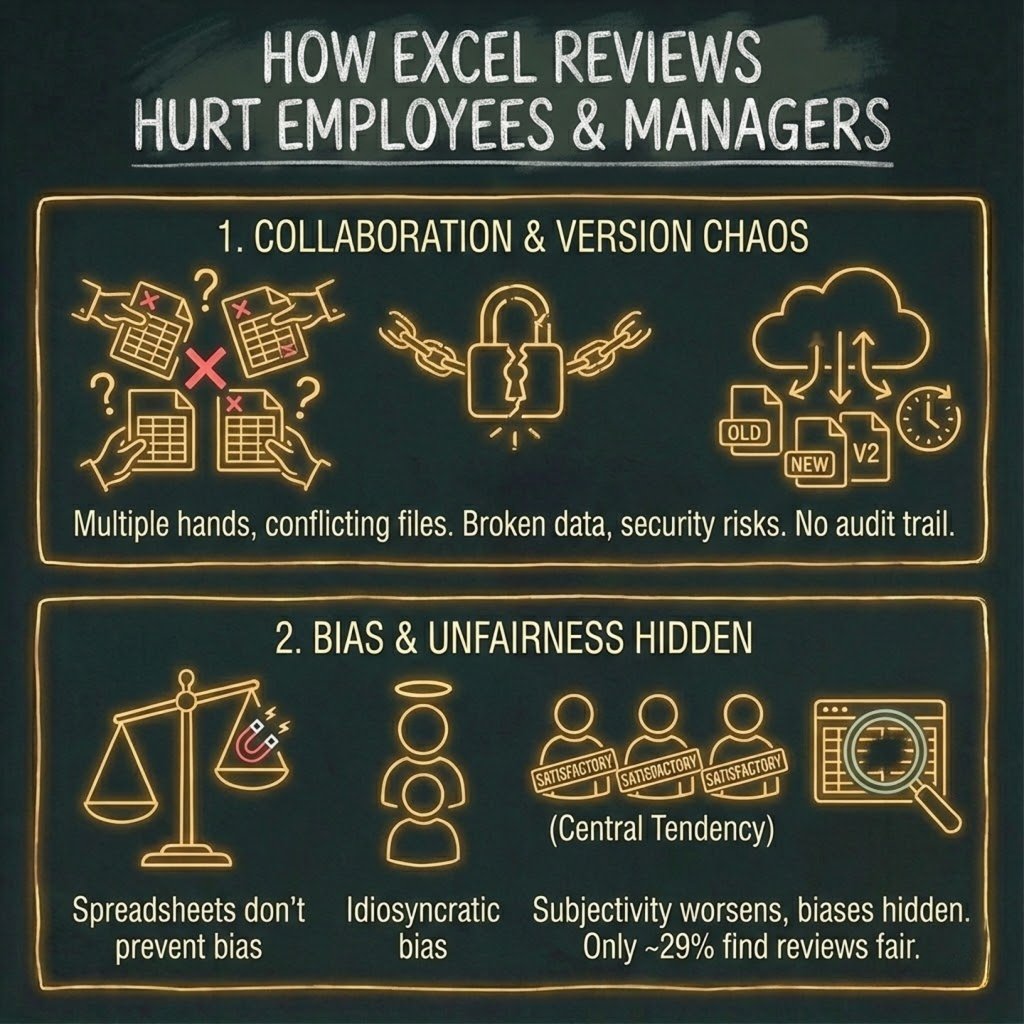
Collaboration becomes a nightmare when multiple versions of a file circulate via email, leading to conflicting changes and outdated data.
As you handle more data, spreadsheets slow down and may even crash. In short, Excel’s limitations in scaling and automation waste time and lead to larger losses as your team grows.
Collaboration and Version Control Problems
Performance reviews require input from HR, managers, peers, and, sometimes, direct reports. With spreadsheets, this means splitting files, emailing versions, and then manually combining the results.
Every time you send a file, there’s a risk of data breaches or broken formulas. Spreadsheet files don’t have strong access controls, so sensitive information can end up unencrypted in email inboxes or shared drives.
Even password‑protected spreadsheets offer limited security and are easily cracked.
Version control is equally problematic. Without audit trails, it’s hard to see who changed what and when.
Two managers might update the same employee’s ratings separately, leading to conflicting entries.
This confusion leads people to doubt the data and creates extra work to correct mistakes.
Even worse, these problems distract managers from what matters most in performance reviews: coaching and helping their teams grow.
Bias and Fairness Issues
Spreadsheets themselves don’t cause bias, but they don’t help prevent it. Traditional annual reviews are already seen as unfair or inaccurate by a majority of employees.
Gallup reports that only 29% of employees strongly agree that their reviews are fair, and only 26% believe they are accurate.
A mere 14 % strongly agree that performance reviews inspire them to improve.
The biases extend to rating behaviours. Gallup highlights several common biases in performance management: idiosyncratic bias (managers favour employees who behave like them), central tendency (averaging everyone as “satisfactory”), and spillover effects (past performance colours future ratings).
Spreadsheets don’t help reduce these biases. Since Excel lacks built-in prompts or checks, it can actually make subjectivity worse.
HR teams may try to adjust ratings manually, but without built-in analytics to spot differences, biases remain hidden.
The Need for AI and Holistic Evaluation Systems
Modern evaluations go beyond scores. Holistic systems sort employees by experience and education, use multiple criteria, and support career growth.
Such systems ensure employees are evaluated not only on output but also on behaviours, potential and innovation, giving HR leaders a richer picture.
Blending Dashboards With Manual Oversight
An interim step toward full digital transformation is the use of Excel‑based dashboards coupled with manual controls.
In a 2020 study, researchers described integrated business performance monitoring models that combine dynamic data visualisation with manual oversight.
Excel dashboards can gather data from sales, finance, inventory, and HR using templates and interactive features.
Manual controls, such as data checks and exception reporting, help ensure accuracy.
This mixed approach provides real-time insights, reduces manual work with automation, and improves data accuracy while still allowing people to use their judgment.
However, even this mixed approach presents challenges. The researchers note that scalability, dependency on manual processes and data integration complexities require careful management.
To manage these address challenges successfully, consider implementing regular audits to catch potential errors before they propagate through the system.
Establishing clear data definitions and maintaining consistent data practices across departments can further help manage integration complexities.
As data volumes grow, maintaining version control and guaranteeing uniform definitions across departments becomes cumbersome in Excel.
In short, dashboards alone can’t fix the main problems with spreadsheets. They still need manual work and are limited by Excel’s capabilities.
Why Dedicated Platforms Are Better
To truly modernise performance management, organisations need dedicated platforms built for collaboration, security and analytics.
These systems centralise data, enforce role‑based access controls and automate workflows.
They also provide continuous feedback, goal tracking and analytics dashboards that highlight trends across departments.
Platforms like Talstack take this concept further by integrating learning and development into performance management.
Talstack’s products include:
When performance management includes learning and analytics, platforms like Talstack help managers coach more frequently, support employees as they build new skills, and enable HR to make decisions using real-time data.
You no longer have to wait six or twelve months to find problems. Feedback becomes part of everyday work.
Moving from spreadsheets to a modern platform takes time. Here’s a straightforward plan to help you get started.
1. Assess Your Current Process
Start with an honest audit. How many hours do managers spend on spreadsheet‑based reviews? What errors have surfaced in the past? Which metrics are missing?
Use these insights to make a case for change. If you’ve had problems like duplicate files, version conflicts, or lost data, write them down. Sharing these stories will help leadership understand the need for change.
2. Choose the Right Platform
Research platforms that align with your organisation’s size, industry, and cultural context. Key evaluation criteria should include:
- Scalability: Ensure the platform can grow with your team.
- Security: Ensure robust access control features to protect sensitive data.
- Usability: The platform should be user-friendly and require minimal training for adoption.
Must-have features or questions to ask vendors include:
1. Does the platform offer real-time analytics for ongoing insights?
2. How does the system handle role-based access controls and collaboration?
3. Are there features for automated feedback collection and goal tracking?
4. Does the solution offer mobile access or offline capabilities for remote teams?
For African firms, consider local support and connectivity requirements. Look for solutions like Talstack that include goal management, 36-degree feedback, and learning integration.
3. Clean Data and Migrate
Before migrating, clean your existing data. Remove duplicates, correct errors and standardise formats.
This step helps you avoid transferring bad data into the new system. Most modern platforms have tools for importing data. Use these tools to match your spreadsheet columns to the new system’s fields.
4. Train Managers and Employees
Even the best platform fails without user adoption. Host training sessions for managers and employees.
Emphasise benefits: easier collaboration, transparent goals and automated reminders.
Show how to set up reviews, collect feedback, and understand analytics. Encourage questions and create written guides or video tutorials.
Keep in mind that Excel requires specialised skills, but digital platforms like Talstack are designed to be easier and more user-friendly.
5. Align Goals, Learning and Feedback
Once the system is live, embed performance management into daily workflows. Define clear goals at the company, team and individual levels. Use learning paths to address skill gaps revealed during reviews.
Encourage regular feedback rather than just yearly ratings. Review the data to find trends. Are some departments falling behind? Do certain skills lead to better performance?
By monitoring continuously, you can step in earlier and support employees before small problems turn into bigger issues.
Why can’t I just keep using Excel for performance reviews?
While Excel is familiar and inexpensive, it’s prone to human errors and lacks collaboration and security features. Studies show that errors occur in roughly 1 % of formula cells, and simple mistakes have caused multimillion‑dollar losses. Spreadsheets also fail to provide historical context, analytics or real‑time collaboration, all of which are essential for effective performance management.
Our company is small. Do we really need a performance management platform?
Smaller teams can sometimes manage with spreadsheets, but scalability becomes a problem as headcount grows. Spreadsheets lack version control and become unwieldy when multiple collaborators work on them. Even small businesses benefit from platforms that automate reminders, align goals and provide feedback analytics. Many modern tools offer affordable tiers for startups and SMEs.
How do digital platforms handle bias?
No software can eliminate bias completely, but platforms can provide structured questions, standardised rating scales and analytics that flag inconsistencies. Some systems incorporate AI to detect patterns of rating inflation or demographic disparities. They also make it easier to collect 360° feedback, decreasing dependence on a single manager’s perspective.
Isn’t switching expensive and time‑consuming?
Setting up a new system takes investment, but the benefits usually outweigh the cost. Gallup estimates that poor performance management can cost millions. Digital platforms save time by automating workflows and reducing errors. Many vendors offer migration support to make the switch easier. Platforms like Talstack can also lower the cost and time needed for setup.
What’s the first step I should take?
Start by auditing your current process. Document how many hours are spent on reviews, the types of errors you encounter and the pain points for managers and employees. Use this information to build a business case for adopting a modern platform. Then pilot a solution with a small team, gather feedback and refine before rolling it out company‑wide.
Using Excel for performance reviews might seem easy, but it often wastes time, causes frustration, and puts your organisation at risk of costly mistakes.
Switching from spreadsheets isn’t only about saving money. It also shows that you value your people.
A modern performance management ecosystem integrates goals, feedback, learning and analytics to create an environment of ongoing development.
Software such as Talstack offers performance review tools and 360° feedback. They make workflows smoother, reduce mistakes, and provide live insights. Performance management becomes a regular part of work, not just a yearly task.
As an HR leader or manager, you can stop the late-night struggles with spreadsheets so that you can start having real coaching conversations with your team.
Start small: review your current process, research solutions, and test a digital platform with one team.
Track the improvements from these modern systems by measuring time saved on admin tasks, fewer spreadsheet errors, and better employee engagement scores.
Use clear KPIs, such as error-reduction rate, time to complete reviews, and changes in engagement scores, to measure your return on investment.
In a few months, you’ll wonder how you managed before. Your employees deserve better, and your business will benefit too.